


DigitOil
To understand the origins of Paprlss, we need to start from the beginning, when DigitOil was founded. When we first started, our mission was to create an application that would help oil and gas companies better capture and manage incidents from the jobsite. In 2014, a lot of the companies working in the industry reported issues through phone calls, text messages and emails. We knew the industry was looking for tools more operationally aligned, and we created Wellsite Report.
As our application evolved and our customer base grew, we realized we needed more than just an incident reporting tool. Customers wanted to add audits, checklists, invoices, field tickets, and the list goes on and on. Our solution to this problem was our Form Builder Module and even though we have added some pretty cool features over the years, it is still our most popular.
Our Form Builder Module is a very powerful tool and is more than capable of handling the needs of potential customers outside of industry, it was built for oil and gas. We thought it would be great to leverage our experience and create something that could be used by people not in the industry. To serve a larger audience, we needed to create a new application – Paprlss was born.
Foundation
Wellsite Report did a great job of serving small to medium sized businesses. We think Paprlss could have the same appeal and we designed it with that in mind. The application is easy to use and built for businesses and consumers alike.
The foundation of the application can be broken into five major categories – capture, access, data, team, and feedback. Each of these serve as a root to most of the features currently available. Future development will expand on these, with your feedback, to make Paprlss even more powerful and easy to use.
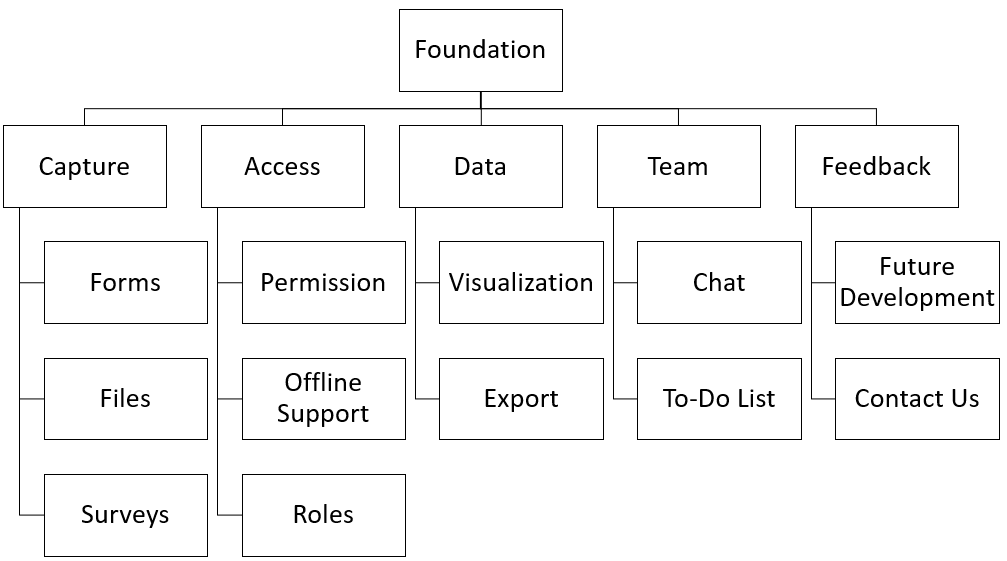
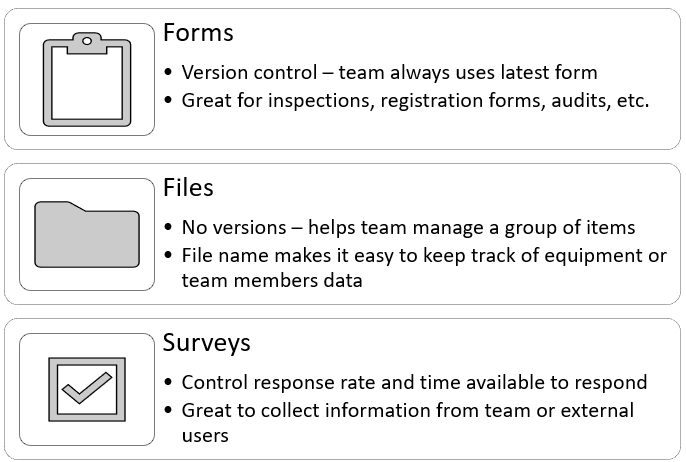
The first category of features deals with the capturing of information which we call documents. Each document type is designed to serve a unique purpose, giving the user multiple options. Currently, we have three data capture options, or documents, available: Forms, Files, and Surveys. Figure 2 shows the basic differences for each option and their intended use.
Next, we focused on accessibility to each created document and support for users when they are offline. Using the latest in web technology, users can access the application even when a WIFI connection or cell signal are not available. When the connection is restored, the data is synced automatically. You can also control who can submit, view, edit, and delete each document. With our custom roles, team administrators have the ability to create unique groups in your team with very specific access.
Once the information has been captured, we wanted to give users the tools to visualize and manage their data. The dashboard contains several detailed graphs and informative cards to make sure you and your team are fully aware of the activity in the application. Of course, for more detailed views, you can export each document’s submissions to excel or export a single submission to PDF.
To keep the team engaged, we have added a chat and to-do list. The chat can be seen by all team members and will track if the user has any unseen messages. A to-do list is available on the dashboard with two options. One to keep track of things important to the individual user and another for team items.
Finally, and most importantly, we developed multiple ways to get feedback from our users. As with most applications, we have multiple ways users can reach out if they encounter a problem, but we also made sure it was easy to communicate something you would like added or something you think can be improved. With future development in mind, we will also have a tool that shows users a list of potential features and give them an opportunity to vote on what gets selected.